How to Bid and Complete Transcription Tasks on Golden Eagle Commerce
🎧 How to Bid and Complete Transcription Tasks on Golden Eagle Commerce
Online transcription has become one of the most popular ways to earn money online, and at Golden Eagle Commerce, we provide members with access to both Premium and Regular transcription jobs. Whether you are a beginner or an experienced transcriptionist, understanding how the system works is essential for maximizing your earnings and completing tasks successfully.
This guide explains everything you need to know about bidding, accepting, transcribing, editing, and submitting transcription jobs on the Golden Eagle Commerce platform.
🚀 Getting Started
Before accessing transcription jobs, you must first log into your Golden Eagle Commerce account. Once logged in, navigate to the Transcription Dashboard from your member area.
Your transcription dashboard is your control center where you can:
- 💰 View your account balance
- 📋 Check available transcription tasks
- ⏱️ Purchase transcription minutes
- 📊 Monitor task progress
- 📂 Access assigned jobs
- 💵 Track your earnings
Understanding this dashboard is the first step toward becoming a successful transcriptionist.
📌 Understanding the Two Types of Transcription Jobs
⭐ 1. Premium Transcription Jobs
Premium tasks require members to have transcription minutes before they can access and accept the work.
- Available throughout the week
- Can be accepted immediately
- Require sufficient transcription minutes
- Instant task assignment
📄 2. Regular Transcription Jobs
Regular jobs do not require purchased minutes. Instead, members submit bids and wait for clients to review and assign the work.
Regular jobs are posted on:
- 📅 Monday
- 📅 Wednesday
- 📅 Friday
To increase your chances of securing work, check the platform regularly on these days.
💳 How to Purchase Transcription Minutes
For Premium Jobs, members need transcription minutes before they can unlock tasks.
- 💵 $2 = 20 Minutes
- 💵 $4 = 45 Minutes
Additional packages may be available depending on current platform offerings.
Once purchased, the minutes are automatically reflected in your account and can be used immediately.
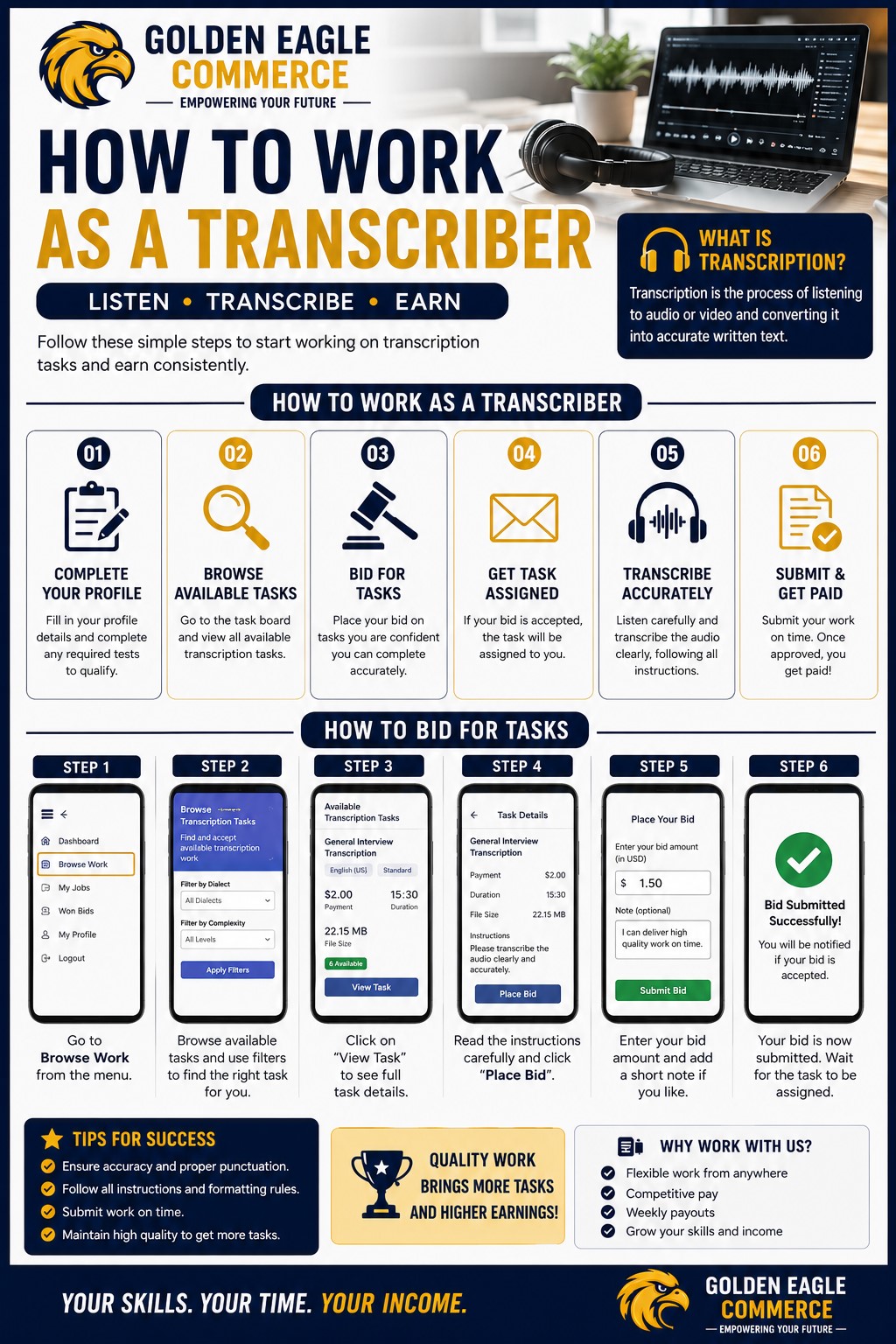
🔍 How to Find Available Tasks
From your Transcription Dashboard, navigate to:
All Available Tasks
This section displays all active transcription opportunities available on the platform.
You will find:
- ⭐ Premium Tasks
- 📄 Regular Tasks
Each task contains important information including:
- 🎧 Audio length
- 📝 Client instructions
- 💰 Payment amount
- 📂 Task type
- ⏰ Deadline
Always review these details carefully before accepting or bidding on any assignment.
⚡ How to Accept Premium Tasks
Premium jobs are designed for immediate assignment.
The task is instantly assigned to your account, allowing you to download the audio and begin working immediately.
📨 How to Bid on Regular Tasks
For Regular Tasks, members must first submit a bid.
Your application is then sent to the client for review.
If selected, you will receive an email notification confirming the assignment.
🏆 Accessing Assigned Tasks
Once assigned, your work appears under:
Won Bids
This section contains:
- 📂 Task details
- 🎧 Audio files
- 📝 Client instructions
- ⏰ Deadlines
Download the audio file and carefully review the instructions before beginning your work.
🤖 Using TurboScribe AI for Transcription
Many transcriptionists use TurboScribe AI to speed up the transcription process.
TurboScribe can save time and improve productivity, but AI-generated transcripts should always be reviewed carefully.
✏️ Editing Your Transcript
After receiving the transcript:
Ensure you:
- ✅ Correct spelling mistakes
- ✅ Fix grammar issues
- ✅ Verify speaker labels
- ✅ Remove inaccuracies
- ✅ Follow client formatting requirements
- ✅ Match the requested transcription style
Quality editing is often the difference between approved and rejected work.
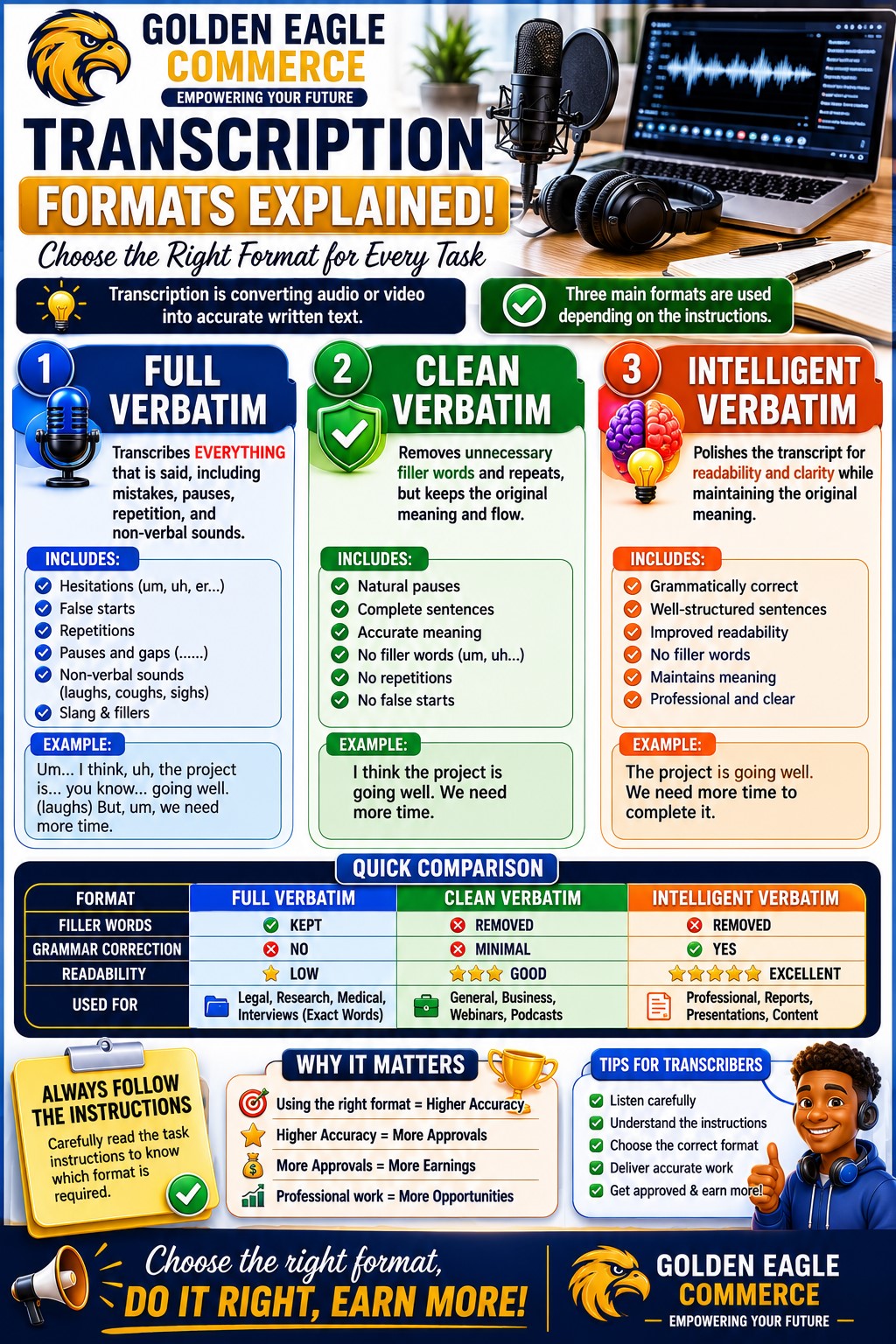
📖 Understanding Transcription Formats
📝 Verbatim Transcription
Captures every spoken word exactly as heard.
Includes:
- Filler words
- Repetitions
- False starts
- Pauses
- Slang expressions
"I, uh, think we should, um, start tomorrow."
📚 Clean Verbatim
Improves readability by removing unnecessary speech elements.
"I think we should start tomorrow."
💡 Intelligent Verbatim
Focuses on meaning rather than exact wording while maintaining the speaker's intended message.
Commonly used for:
- Business meetings
- Interviews
- Professional reports
- Corporate recordings
⏰ Understanding Submission Deadlines
Most transcription assignments must be completed within 5 hours.
To avoid missing deadlines:
- 📥 Download audio immediately
- ⚡ Start work promptly
- 🕒 Manage your time wisely
- 🚫 Avoid last-minute submissions
Timely delivery is critical for maintaining a strong reputation on the platform.
📤 How to Submit Completed Work
The client will then review your work.
💰 Getting Paid
Once your transcription is approved:
- 💵 Earnings are credited to your dashboard
- 📊 Your balance is updated automatically
- 📧 A confirmation email is sent
Payment reflects the successful completion of your assignment and contributes toward your overall earnings.
🏅 Tips for Success as a Golden Eagle Commerce Transcriptionist
- 📖 Read instructions carefully
- 🎧 Use quality headphones
- ⌨️ Improve typing speed
- 🔍 Proofread every transcript
- ⏰ Submit work before deadlines
- 📚 Learn all transcription formats
- 🤖 Use AI tools responsibly
- 💼 Maintain professionalism
The more accurate your work, the more opportunities you can secure in the future.
🚀 Start Your Transcription Journey Today
Golden Eagle Commerce continues to create opportunities for individuals looking to earn online through transcription. By understanding how to bid on tasks, purchase minutes, use transcription tools, and submit quality work, members can build valuable skills while generating income from anywhere.
Whether you choose Premium Tasks or Regular Jobs, consistency, accuracy, and professionalism will help you succeed as a transcriptionist and grow your online earning potential.
🦅 "Success in transcription comes from accuracy, consistency, and continuous learning. Start today and grow your online income with Golden Eagle Commerce."